| Developer | SCIntilla |
| License | Free |
| Download | Free Download |
Ever thought about what SciTE means? It is an abbreviation of Scintilla-based Text Editor. SciTE is a multi-platform text editor that incorporates the Scintilla editing component. Neil Hodgson, the author, has released it under a very minimal version of the Historical Permission Notice and Disclaimer (HPND).
SciTE was released for the first time in 1999, more than nineteen years ago. SciTE, as a text editor, is tailor-made for source code editing. It features some basic capabilities similar to other text editors but it is mainly aimed at programming and code development. SciTE, being a C++ program, works on Microsoft Windows and Linux and it is even portable from USB flash drives.

SciTE
There are three central reasons for which SciTE makes a perfect choice as a text editor. Let’s delve into them:
SciTE: Highly Configurable
SciTE has a reputation for being very adjustable. Although GUI preferences are not available, you can change the settings completely just by editing plain text configuration files. This adaptability gives you the capability to have different settings for each programming language or project, thus making the editor a perfect fit for your needs.
Besides that, with the numerous menu options available, you can decide how the different features should be used and, at the same time, efficiently organize your workflow.
Some Basic Features That Are Handy
Just as any other text editor, SciTE is packed with the basic features that are helpful in programming and general text editing. Among the very useful features, one can name:
- Syntax Highlighting
This feature is indispensable if you are programming or scripting, or working with markup languages like HTML. You can differentiate the colors and fonts of different groups of terms, thus visually separating your code making it easier to read. Oftentimes syntax highlighting is combined with other features like spell checking and code folding to make editing more productive and error-free.
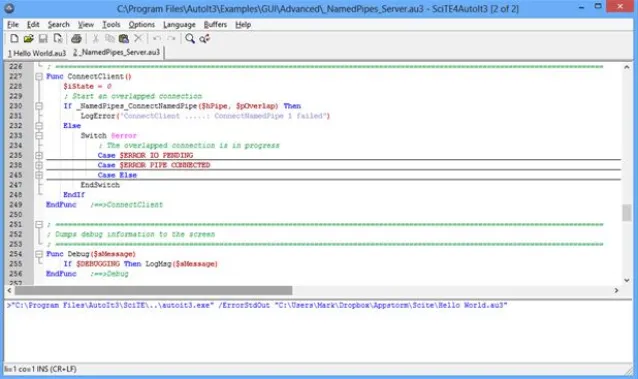
SciTE Latest Version
- Regular Expression
SciTE is a text editor that lets you use regular expressions to create search patterns. You can use these patterns with find and replace to quickly modify a large or complicated file.
- Copy and Paste Formatted
Copy and paste is a standard function in most text editing software, and SciTE is no different. It allows you to take a portion of text, whether it is a word, sentence, or paragraph, and place that exact copy somewhere else in the file. Such a feature is very convenient when handling big files.
- Multiple Selections
SciTE is also equipped with multiple selections, which means, for example, you can pick two or three options simultaneously from a drop-down menu. This functionality brings to you the freedom and ease in editing or reformatting the text.
- Embedded Lua Programming Language
SciTE features an integrated Lua programming language which can be used for deep customization. Lua programs operate through the Scintilla API and with this kind of communication, you can develop solutions like autocompletion or any other feature tailored to your necessity.
You may also interested in Download Canon IJ Scan Utility and Download iCare Data Recovery for that you can visit our website.
Conclusion
By looking at the functionalities, SciTE is a massively flexible and highly configurable editor that could be a great addition to your list of editors. The finest way to learn about an editor’s features is to use it yourself and experience how it can facilitate your development and text editing tasks.
Related Post