| Developer | Mac Daddy |
| License | Free |
| Download | Free Download |
When you want to do a clean installation of your operating system, a crucial step is making a bootable installer on a USB flash drive. But what is a bootable installer, and have you ever made one?
A bootable installer is basically a USB flash drive installer that can replace the DVD installer. It is a USB flash drive from which you can install or reinstall your operating system without the need for a DVD. One of the very simple ways to make a bootable installer is by using the Install Disk Creator tool. Just download this application, and in no time, you will have a bootable USB flash drive for installing your OS.

Install Disk Creator Logo
Besides being the main tool for a fresh install or OS update, Install Disk Creator contains a few other handy utilities. It can serve as a medium to erase a partition on a computer without the need for the operating system, fix the file system through Disk Utility, and even reset the passwords of user accounts. Without a bootable installer, it is very difficult for a PC or laptop to start up if it does not have a bootable partition.
How to Use Install Disk Creator
Making a bootable installer with the help of this app, basically, you need to have three things. Each of these is mandatory and cannot be substituted:
A computer with Install Disk Creator installed – Get the app.
A USB flash drive – The storage capacity has to be 8GB or more and it has to be empty. Format the USB drive with Disk Utility on your computer and give a partition name to it before usage.
A computer with an internet connection – This is necessary to download and set up the bootable installer.
When you have these ready, you can create your bootable USB for installing or reinstalling the OS.
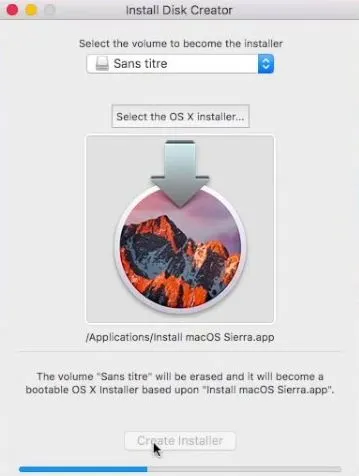
Install Disk Creator Latest Version
You may also interested in Download Virtual CloneDrive Latest Version and Download UC Browser for PC for that you can visit our website.
Occasionally, users might have trouble downloading the app. It often occurs if the file is not only incomplete but also smaller than it should be. You can prevent such problems if you ensure that your internet connection is both stable and fast so the download can be fully completed. As soon the download is done the installation window will pop up. Close it, then here is what you need to do:
Preparing a Bootable USB Using Install Disk Creator
- Insert your USB flash drive into your computer.
- Launch the Install Disk Creator app located in your Downloads folder.
- Choose the operating system you wish to install and hit the RETURN key.
- Type your administrator password when asked to initiate the bootable USB creation process.
- Be patient until the process is done. Normally, it lasts for about 25–30 minutes.
After the completion of the process, the USB flash drive will be all set for the OS installation or reinstallation.
Related Post