| Developer | iCare All |
| License | Free |
| Download | Free Download |
Did you or your team ever unknowingly scrap essential files from your hard drives or flash drives? Suppose, for instance, the case when you deleted a signed business contract between your company and project partners. What would you have done besides recreating the file? You might be surprised that there are ways to recover deleted files and partitions.
Regardless of the situation, with the appropriate software, you can reestablish the documents which were mistakenly deleted, lost due to a crash of the operating system, after formatting drives, virus attacks, or other unforeseen circumstances.
iCare Data Recovery is a highly efficient recovery tool that can be used on both Windows and Mac and supports complete file, partition, and data recovery. This software is capable of addressing various scenarios of data loss – from files deleted from the Recycle Bin to files lost because of a software crash, formatting or corrupting of the drive, virus attacks, lost partition, and some other unknown reasons. Besides, it can even recover the partition files while leaving the names of those files and the storage paths as they were originally.

iCare Data Recovery
How to Use iCare Data Recovery
First, download and install iCare Data Recovery, then launch the software and decide the storage device location for the data recovery.
Choose the Type of Data Initially, you are required to decide the types of files you want to recover. To make it even easier, you can simply select “All Types” and click Continue.
Select the Storage Media After that, you choose the drive or storage media where you want to perform the scan and click Scan.
View Scan Results Once the scan is complete, the interface will show a summary of the recovered files. You can use the left sidebar to sort the results by Path, Type, or Time. The main area displays the file names under each folder, so it is very convenient to find and restore the files you want.
If you’re unable to find the data you’re looking for, try using the Deep Scan feature. This mode conducts a RAW scan and is a little slower – typically takes about 15 minutes – but it gives the program the ability to find even more complete and detailed data. Once the Deep Scan is over, the results are much more extensive. For instance, in one scan, the app managed to recover as much as 28 GB of data.
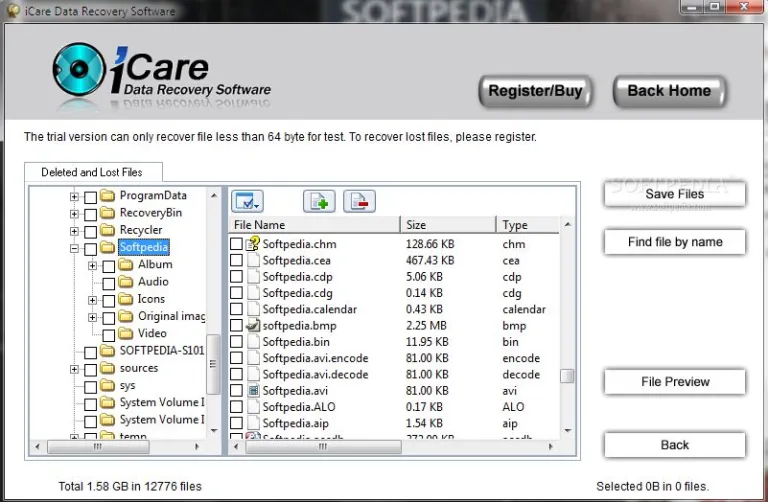
iCare Data Recovery Latest Version
How to Restore Files using iCare Data Recovery
It’s easy to restore files using iCare Data Recovery. Firstly, indicate the folder or the files you want to recover. Then, at the top, tap the Recover button and decide on where you want the recovered files to be saved—your Documents folder works fine.
Usually, the recovery takes only a few minutes as the most time-consuming step—the Deep Scan—has already been done. Once the files have been recovered, use Finder (or File Explorer) to head to the Documents folder. The software will place all the recovered files in a new directory named RAW_0001.
You may also interested in Download ImgBurn Latest Version and Download SanDisk RescuePRO Latest Version for that you can visit our website.
Important Note: iCare Data Recovery will only bring back files that haven’t been overwritten by new data. Suppose you delete a 2 GB file from a 16 GB flash drive and subsequently put 15.5 GB of new files on the drive—the probability of being able to completely recover the deleted file is near zero because a large portion of the file’s data has been overwritten.